Subscribe to Zinmag Tribune
Subscribe to Zinmag Tribune by mail
Showing posts with label PC Expert. Show all posts

What Makes Windows 8 Wonderful

Sunday, October 09, 2011 Reporter: The Home Treatment 0 Responses
Here’s something that makes Windows 8 beautiful, delicious and the OS of future!


1. Innovative Design

Windows 8 is blessed with an intuitive and an innovative design. The design though basically made for touch screen netbooks or a few desktops, runs wonderfully on normal computers i.e. the computers without touch equipment as well.

If you have had a look at the Windows 8 interface, the user interface is totally tile based just like you see in Windows 7 powered mobile phones. The tile based interface is quite attractive, but if I am not wrong you will get a phony experience even in your desktop! Some might like it, while some might not. I somewhat like the interface as it’s something I haven’t ever seen in a desktop, but I am not sure if with time it will prove boring.

2. Security +1

Have you ever seen a computer with a “factory reset” option? Well if you haven’t, you can see it in Windows 8! Windows 8 comes with a factory reset option which refreshes your entire system and takes your computer back to when you had bought it! This ensures that all your personal data is removed and all the bugs or malware which have accidentally entered your PC are removed as well!

Thus, if in future you decide to sell your computer or laptop, Factory reset feature will prove to be a boon!

3. Speed… speeder… speediest!

Windows 8 is awesomely fast! Windows 8 uses less than half amount of memory Windows 7 used. Accordingly the system is very fast and some have even commented that Windows 8 loads in less than 8 seconds! Yeah, you read it right – 8 s-e-c-o-n-d-s!! At first I couldn’t believe it, but seeing the screenshots and the construction of Windows 8, I was forced to believe it!

So one thing that is guaranteed with Windows 8 is SPEED! You can expect a very fast experience even on an older computer with low specifications.

4. App Store?!

Windows 8 has a dedicated app store as well. Just as Android, iTunes Windows 8 comes with an app store! This allows you to take your computing to the next level. The app store will permit you to find the latest applications, install them on your device and start experiencing it immediately! I am soon expecting them to offer coupon apps which presents latest coupons on my desktop for example TRX coupons & diamonds USA coupons. I am sure the future release i.e. public release will boast of many apps!

I am assuming the apps to be very light-weight and thus fast loading. After all the system itself uses less than 300MB RAM!!

5. Runs On Tablets, Notebooks, Laptops & Desktops!

Hardly do we see an OS running on all platforms, fortunately Windows 8 is among them! Windows 8 can run on your old desktop computer, your past time laptop, your present netbook and even your future tablet! Of course, they have to be supported by Windows!

6. Mobile & Computer Mixed?

I somehow think that Microsoft has mixed mobiling with computing and the result is Windows 8! Having image locks, pin code as passwords, sensor support, app marketplace, etc. The interface hardly makes me feel that I am using a desktop! It looks a lot like my Windows 7 powered mobile phone, but it’s attractive!

What do you think? How will people take on Windows 8? Do you think it will attract people or will it just come & go. Do you think Windows 8 is a great competitor to Mac? Do let us know your views. I, Microsoft & Apple all want to hear you say!


Source: Geek4shares

Read more...

5 Ways Steve Jobs Changed Our Lives

Saturday, October 08, 2011 Reporter: The Home Treatment 0 Responses

When Steve Jobs passed away on Wednesday afternoon, the world went into shock. One of the greatest creative and innovative geniuses to ever live was gone. After the shock began to wear off, it was natural to look back on Jobs’ life and realize just how greatly the company he guided changed the world we live in. Here are just five of the biggest things that Steve Jobs brought to us that changed the way we live our everyday lives.

THE PERSONAL COMPUTER

In 1976 when Steve Wozniak built the Apple I and Steve Jobs found a way to make money from it, history was made. For really the first time, people could have a relatively easy to use computer in their home. It was extremely primitive by today’s standards, but that little circuit board that could be connected to a television started a revolution that changed the world. The Woz built it, Jobs sold it, and within a few years; the PC would be one of the most important inventions since the printing press.

THE iPOD & iTUNES

Steve Jobs didn’t invent digital music or the MP3 format, but like everything he had a hand in; he took it to the masses in a way that no one else did before. There wouldn’t be “Podcasts” if not for the iPod, and the iTunes music store completely changed how people buy and experience music. The record industry may hate it, but iTunes and Apple’s MP3 player changed the world of music.

THE iPHONE

Yes, there were smartphones before the iPhone…but the iPhone was the first to get the idea right and again be taken to the masses. Android phones may outsell the iPhone by two-to-one, due the the sheer number of Android handsets out there, but the iPhone is still the standard that everyone wants to kill.

THE iPAD

Like with the iPhone, there were tablets before the iPad. But also like the iPhone, the iPad was really the first tablet to catch on in a big way. The iPad may end up being one of Steve Jobs’ biggest legacies as its bringing computing power into the hands of people who otherwise would be afraid to use a computer. .

PIXAR

When George Lucas decided to not continue on with Lucafilm’s little computer animation division, Steve Jobs saw something special there and entertainment was forever changed. The Toy Story trilogy, Finding Nemo, Monsters Inc., The Incredibles, Ratatouille, and Wall-E. It’s kind of hard to imagine the last twenty years of movies without Pixar, and if not for Steve Jobs; we may not have had those films.

Read more...

The 21 Greatest PC Mysteries--Solved!

Thursday, October 06, 2011 Reporter: The Home Treatment 0 Responses

Modern PCs are certainly marvels of technology--and yet for all their advances, computers still do crazy, inexplicable things. With the average machine, there's enough mystery to keep Sherlock Holmes or Miss Marple hopping for a month--and enough frustration to make the average user want to commit murder most foul.

Computing mysteries tend to be less "Who dunnit?" and more "Why won't it?" For example, you may have puzzled over why Windows obstinately re­­fused to let you delete a stalled print job, or wondered why you couldn't find the file you just downloaded. But worry not: We've rounded up these and other mindbogglers of the PC universe--and solved them for you.

(For explanations and helpful tips, click the links.)

Where did my downloaded files go? Why can't I find them?
Your browser chooses where downloads go, but you can control the process.

Why doesn't my iPad charge when I connect it to my computer? 
Your PC's USB port doesn't supply enough juice--but you can still charge your iPad, gradually.
 
Why does a video play on my desktop but not my laptop?
If a computer doesn't have the specific decoder for a video format, you can't watch the video. Get the right one.. 

My printer won't print, and Windows won't allow me to cancel or delete print jobs. What's going on?

Usually this is the result of a communication problem between the PC and printer. Get them talking.
I hear beeps when I turn on my PC. What do they mean?

Those beeps come from the BIOS (a piece of software built into the motherboard). Find out what a "beep code" means.

In a folder full of digital images, I often notice a file called Thumbs.db. What is it, and can I safely delete it?

Thumbs.db is a Windows XP system file that contains the thumbnail cache for a particular folder. You can tweak Windows to get it out of your way. 

Why does every digital camera--even the one on my smartphone--insist on storing photographs in a folder called DCIM?

DCIM (for Digital Camera IMages) is the default directory structure for digital cameras--and having such a standard is very useful.

My Recycle Bin has disappeared. How do I go about restoring it?

Whether it was a victim of a glitch or never available in the first place, you can follow a few simple directions to restore the Recycle Bin.

Why does Windows sometimes reboot without my permission, and how do I prevent that from happening?

This problem relates to how Windows installs automatic updates. Fortunately, you can make some tweaks.

Where do all these mysterious Web browser toolbars come from, and how do I get rid of them?

Sometimes spyware installs browser toolbars, and sometimes you do it accidentally during software installation.

How did I end up with QuickTime on my PC, and do I need to keep it?

This media-playback software comes bundled with iTunes and installs along with it.
I have Microsoft Word installed on my PC. Why can't I open the .docx files my friend sent me?

If you use Word 2003 or an earlier version of the program, all you need is the Microsoft Office Compatibility Pack for Word, Excel, and PowerPoint 2007 File Formats.

Why won't Windows allow me to delete a certain file?

If Windows refuses to delete a file or folder, some application or process is accessing it.

Why do some programs leave files and folders behind even after I've uninstalled them?

Many programs' uninstallers are ineffective. Use a utility that removes not only the application but also all of the pieces it leaves behind.

Why do Adobe Reader and Java update so frequently? Do I have to allow it?

Most Adobe and Java patches are made to plug security holes, so you should update them--or use alternative software.
Is it absolutely necessary to update Windows?

Yes, you should definitely apply Windows updates for security reasons, but you can take a few steps to cut down Windows' nagging.

Does it matter whether I ‘Safely Remove' devices?

Absolutely: If you ignore Windows' requests to "Safely Remove" your storage media, you could end up with corrupted files, un­­readable media, or both.
 
Windows asks me if I want to enable Sticky Keys. What are they, and how should I use them? The Sticky Keys feature makes certain keyboard functions easier to access.

Why can't I send out a particular file attachment through e-mail? The file is probably too large. Check out free services that let you work around file-size restrictions. 

How can I determine whether an unknown Website is safe to visit?

Read our suggestions on figuring out whether a link is safe from malware or other threats before you click it.
What are the .dat files I sometimes receive in e-mail messages, and how do I open them?

Microsoft Outlook uses a modified version of Rich Text Format to preserve fonts and the like, but it often causes problems for the recipient. We have three suggestions for coping.


Read more...

Goodbye Steve Jobs

Thursday, October 06, 2011 Reporter: The Home Treatment 0 Responses

Steve Jobs is dead. The Apple chairman and former CEO who made personal computers, smartphones, tablets, and digital animation mass-market products passed away today. We're going to miss him. Deeply, and personally.

Steven P. Jobs passed away on October 5th, 2011 after a long struggle with pancreatic cancer. He was just 56 years old. We mourn his passing, and wish his family the very best.

Let's address this up front: Gizmodo and Steve Jobs had, at best, a tumultuous relationship. Yet no matter how much he may have hated us, we admired him.

No, that's not quite right. We loved him.

He was the reason many of us got into this industry, or even care about technology at all. He made the computer personal, and the smartphone fun. Bill Gates may have put a computer on every office desk, but it was Steve Jobs who put one in every dorm room and bedroom and living room. And then, years later, he repeated the trick, putting one in every bag and every pocket, thanks to the iPad and iPhone. If you use a computer or smartphone today, it is either one he created, or an imitation of his genius.

He changed the way movies are made, the way music is sold, the way stories are told, the very way we interact with the world around us. He helped us work, and gave us new ways to play. He was a myth made man.

Prior to Steve Jobs, computers were alien to most of us. They were accessible to few people without an engineering degree. Not merely because of their complex operating procedures, but also because they were so cold and so inhuman. Jobs understood that they could be something more than that. That while computers would never be people, he could endow them with humanity. He could transform them into machines that not only anyone could use, but that everyday people would enjoy using thanks to the art of great design. He made them something that would be part of our lives. And he did that again and again.

His life story is familiar, but it deserves repeating. He was given up for adoption by his unmarried parents. He grew up in California, and was very much a product of that place and time. He took drugs. He got into phone hacking. Both were precursers to what would always be his interest: changing the status quo.

In 1976 he started Apple in a garage. Together with Steve Wozniak, he shipped the first true fully-built personal computer, the Apple I. He drove development of the Mac, understanding that it was the future of computers. The great thing that we would all see. He brought in a grown up to run the company. And that grown up forced him out of the company that he built and into the wilderness.

While he was gone, he started NeXT computer. The NeXT operating system would form the underpinnings of Apple's OS X, and iOS.

He also started the best movie studio of the past 30 years. Pixar's films were innovative, to be sure. It pushed the boundaries of CGI to such an extent that even today its early films still look great. But technology is only a tool. As with everything else he understood that great technology alone is not enough. It must be human to have an impact. Pixar movies tell stories. They make grown men cry. That was the impact of Steve Jobs.

He became a family man. He reunited with his biological mother, and his sister, the writer Mona Simpson. He married. He had children. He was, by all accounts, a great dad. It was his role as husband and father that helped drive his second act at Apple.

After his return to Apple, the company began shipping iconic product after iconic product. Products that defined a decade. The iMac, OS X, the iPod, iTunes (which was very good, before it was very bad), the iPhone, the iPad. All of these were deeply human products. They reflected his understanding of how technology was used not only in the workplace, but in the home. In his keynotes, product demos typically showed not executives, but families.

He made Apple into the most valuable company in the world.

He never met his biological father.

He accomplished so many things, in so many fields that it's tempting to compare Jobs to someone from the past. A Thomas Edison or a Ben Franklin or even a Leonardo Da Vinci. We tend to do that because it helps us understand. But it does him a disservice. He was unique. His own person. Our own person.

He was our emblematic genius. In 100 years, when historians talk about the emergence of the age of intelligent machines, it is Steve Jobs they will hold up as the great exemplar of our era.

They will remember his flaws, too. When Atari hired Jobs and Woz to write the code for the iconic Atari game Breakout, the pair earned a $5000 bonus for completing the work, largely done by Woz. But Jobs kept the bonus a secret, and only paid his partner $375. When his daughter Lisa was born in 1978, he spent two years denying he was her father. His denials forced her and her mother to support themselves on welfare. In the workplace he's often been described as temperamental and even petulant. He could be arrogant and unforgiving.

He was not a god. He was simply a man.

Yet for all his faults, he changed the world. He made it better.

He once famously asked of a critic "what have you done that's so great?" For Jobs, the answer to that question was very nearly unlimited.

Our world will be less interesting, less exciting, and less meaningful without him.

Goodbye, Mr. Jobs. We will miss you so very much.

Source: Gizmodo

video platformvideo managementvideo solutionsvideo player

Read more...

10 Photoshop Secrets and Useful Keyboard Shortcuts

Monday, October 03, 2011 Reporter: The Home Treatment 0 Responses
Photoshop is one of the most used designing source used by the professional web designers. It is already known and also proven that using shortcuts increases productivity in very less time. Photoshop is a complex of many tools and features which makes the working on photoshop somewhat hard.

have gathered some collections of photoshop secrets or tricks which can make the designing experience easy and more faster. Keep reading the tricks below and will know how these photoshop secrets can increase your productivity.

Note: This article is written with respect to Mac’s Photoshop. If you are using Windows, Cmd = Ctrl and Opt = Alt.

Drag selection-With the Marquee tool, drag on the document (do not release the mouse yet), now hold down Spacebar, it will let you drag the undefined selection..


Navigate the document left or right-Hold down the Cmd key and scroll up or down allows you to navigate the document left or right. For example, hold down Cmd + scroll up will navigate to right.


Browse the font list-Put your cursor in the font list dropdown, you can browse the font list by pressing arrow Up or Down key.
 

Scale font size-Select the text that you want to scale the font size, press Cmd + Shift + > or < to increase / decrease font size.

Drag to adjust numberic value-Mouseover the input box, hold down Cmd + drag left or right to increase / decrease. Hold down Cmd + Opt or Shift key and drag can change the value in decimal or 10 interval. This shortcut works in all dialog palettes.


Collapse or expand all layer groups-You can collapse or expand all root-level layer groups by holding down Cmd + click on the triangle icon. Hold down Cmd + Opt + click on the triangle icon will collapse or expand all level layer groups.


Navigate layer blending mode-Opt + Shift + “-” or “+” key allows you to navigate through the blending mode dropdown.

  
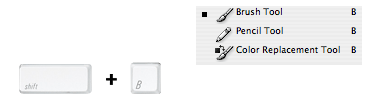
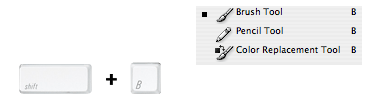
Navigate the tool list-You can navigate through the tool list by pressing Shift + tool shorcut. For example: B = Brush tool, if you press Shift + B again, you will switch to Pencil tool.

Duplicate layer-There are several shortcuts to duplicate layers.1. You can hold down Cmd + Opt + drag to duplicate the active layer.2. Cmd + Opt + arrow keys (Up, Down, Left, Right).3. Cmd + J will duplicate the active layer in exact position.4. Hold down Opt + drag within the Layers palette can also duplicate layers.


Copy visible and paste in a new layer-Press Cmd + Opt + Shift + E will copy the visible layers and paste in a new layer.


Simple Photoshop Shortcut Commands

    Z (Zoom Tool) — This command just brings up the zoom tool, which allows you to zoom in. Like with the hand tool, if you hold down the Alt key, it temporarily switches to the zoom out mode.

    Ctrl + 0 (Fit on Screen) — This is a quick-and-dirty command to get the entire photo in front of your eyes. That’s Ctrl + zero, not the letter “O”.

    B (Brush Tool) — The brush is an extremely useful tool when working with masks, and I’m constantly using this command along with the hand and zoom tools.

    Ctrl + Z (Undo) — Very useful for the little mistakes we all make.

    Tab (Hide/Show Palettes) — Hiding the palettes gives you a little more working room, thus decreasing your need to pan and zoom while editing.

Intermediate Photoshop Shortcut Commands

    [ (Decrease Brush Size) -- Quickly decrease your brush size to get into those tighter spots.

    ] (Increase Brush Size) — Quickly increase your brush size for the larger areas.

    Shift + [ (Decrease Brush Softness) -- Decrease the softness of the brush by 25%.

    Shift + ] (Increase Brush Softness) — Increase the softness of the brush by 25%.

    Shift + 1->0 (Tool Flow) — This works exactly like the opacity changer, but you just have to hold the Shift key down while you hit the numbers.

    Ctrl + Shift + N (New Layer) — This will bring up the new layer dialog box and place a new layer on top of the active layer.

    Ctrl + Alt + Shift + N (New Layer No Dialog) — This command skips the dialog box and just places a new layer on top of the active layer.

    Ctrl + Alt + Shift + K (Show Keyboard Commands) — If you forget any of these commands, or if you want to check on other commands, use this to bring up the help dialog on keyboard shortcuts.


Read more...

The Best Video Advert I've Seen For An AV Product Eset Nod32 v5

Saturday, October 01, 2011 Reporter: The Home Treatment 0 Responses

MANILA, Philippines – Slovakia-based ESET recently launch its flagship products ESET Smart Security 5 and ESET NOD32 Antivirus 5, which the company claims has more advanced detection technology and multi-layered security features.

“With the new technologies we are incorporating into the product like ESET Live Grid and our Advanced HIPS, we will be providing an even more comprehensive protection than ever before,” said Richard Marko, chief executive at ESET, in a media statement. “We always strive to deliver technologically advanced products employing the latest innovations at ESET.”

At the moment, Marko said ESET is already working on developing future generations of our security solutions.

Marko said ESET 5 and ESET NOD32 Antivirus 5 offer various new and improved features such as the ESET Live Grid, which is cloud-based reputation and protection technology; a New Removable Media Control, that will include more granular control of external devices; a Parental Control that is available for the Smart Security 5; Advanced Host-based Intrusion Prevention System (HIPS); and a Gamer Mode.

According to regular ESET threat statistics, removable media is now used increasingly to spread viruses and malware. When plugged-in, a USB media can transfer a hidden virus, affecting computers without the need for Internet access.

Marko said the Removable Media Control feature automatically prompts the user to scan the content of all flash drives (USB, SD), Firewire, CDs and DVDs, so that specific threats can be blocked from trying to get through to the system through the media devices.

The company also said gamers will appreciate the Gamer Mode that switches to silent mode and disables pop ups to conserve system resources and enhance the gaming experience.

“Great performance and no effects on game’s quality: these are the two principal points that matter in the selection of AV software – that is why I trust ESET,” said Marcel “k1llsen” Paul, e-sports gamer in the top gaming league ESC in Germany, in a statement.


Read more...

Steve Jobs: 10 Surprising Things You Did Not Know About Him

Friday, September 30, 2011 Reporter: The Home Treatment 0 Responses
Now, that Steve Jobs resigned from his function as a CEO of Apple, due to his health problems, we could say that an era ended. Who knows if Apple will be innovative as before, now that its founder is capitulating to a  disease with which he is fighting since 7 years? Officially he is still in the chairman of the board, probably for the sake of the company’s shares, which dropped 7 % the night when Steve Jobs resigned. When an era is ending, it’s the appropriate time to make its review. When a man is becoming a legend, it is the right time to make a list of 10 things you did not know about him. Here you have it:

1. Steve Jobs was adopted

steve
The biological parents of Steve Jobs were Abdulfattah Jandali, a Syrian student and Joanne Simpson, who gave him for adoption. Thus, Steve is half Arab, who could have guessed, right? He was adopted by Paul and Clara Jobs and these middle class persons raised him as their own child.

2. Monica Simpson is his sister

2. steve jobs
His biological parents later married and had a girl, who is publically known as well: she is the novelist Mona Simpson. Steve only met his sister when he was 27 years old, and discovered the truth about his adoption. This encounter highly influenced his personal development.

3. He dropped college

3-steve
Steve Jobs never graduated college. He dropped in the second semester, stating that he wasn’t learning anything helpful. It seems like you can do pretty well in life without college though.  Instead, he took a calligraphy class- which he was passionate about-and learned many useful things he would later insert into his first Macintosh. Windows later copied those fonts, and we are now using them. This is only one of the many innovations we should be grateful for.

4. He is a Buddhist

steve
After a trip to India, for spiritual purposes, he returned as a changed fellow: Steve Jobs became a Zen Buddhist. Isn’t it curious, if you think that his biological father is a Syrian Muslim? He really does not have much in common with his natural parents…

5. He never eats meat

steve
Steve Jobs is vegetarian and so is his wife. Actually, Steve also eats fish-the only meat he tolerates-so that would make him a pescetarian. Same as Bill Clinton, who is also one of his friends. I wonder if this is just a coincidence, or one of them influenced the other in this matter…

6. Steve Jobs never gives money to charity

steve
This is one of the most controversial aspects regarding Steve Jobs . He is known to have forbidden all philanthropic projects, as CEO at Apple. Also, neither he nor his wife is known to give any charity, or to have established and charity institution, as most of the other rich people in the world.  He might do it anonymously though, so don’t’ judge the man!

7. The origin of the name “Apple”

steve
Some say that at the origin of the name of his company stands his passion for apples- his favorite fruits. However, others think that, because he was an admirer of Beatles’ Apple Records, he named his brand the same way, to the discontent of the Apple records’ owners who took legal action against him. Who knows, it may be that both versions are half right…

8.  He was once declared dead

steve
In 2008, Steve Jobs was declared dead in 2008 by Bloomerang news wire. According to these folks, he had died of pancreatic cancer-a disease he was diagnosed with back in 2004. The news spread all over the internet with light speed and even though Bloomerang later apologized, it was too late. Everyone had acknowledged the death of the Apple’s CEO. You can imagine the shock…

9.  His salary is close to nothing

steve
Surprisingly, if it were to only consider his earnings from apple, he could one of the poorest guys in the world- he has a salary of 1$. He is not doing so badly actually, because he is the main shareholder at Apple –which brought him earnings of 1.84 billion dollars last year. He also earns about 48million $ from Walt Disney, where he is also director and investor.

10. Steve Jobs cheated on his partner

steve
Back in the day, when he was just a programmer, Steve Jobs was appointed by Atari to create the game called Breakout. He made it with the help of his friend, Wozniak, and they should have shared, according to their own agreement, the earnings 50-50. However, Jobs cheated Wozniak when he received the payment from Atari: He told his friend that Atari gave them 700 $, when the true value was of 5000$ ! Thus, Wozniak only made 350$, while Steve Jobs took most of the earnings.

Read more...

Facebook App SkyyShop - Sell more online

Thursday, September 29, 2011 Reporter: The Home Treatment 0 Responses

SkyyShop offers a new dimension in expanding and improving your online businesses. With SkyyShop, you can utilize the tremendous influence of the internet and Social Media to boost your sales and reach your target market. We ensure that we can help you get ahead of the tough competition in the e-commerce industry.

Online Store
Create your very own Facebook storefront in an instant
    Unlimited item upload
    Manage your inventory
    Categorize your items
    Customize your store theme banner


Purchasing & Payment
Easy collection of payment through SkyyPay and PayPal
    Sales tracking integrated into the Store Management area
    Allows smooth management of VAT and other taxes per zone (country)


Global Feature

Get global foreign exchange rates in real-time
    Stores to be displayed in any supported world currency


Product Management


Manually and automatically select items to feature
    Customized HTML for product pages
    CSV catalog import
    Automated inventory control for one-off items


Added Features
Domestic and international shipping
    Integration to Social Media tools (Facebook & Twitter)
    Shipping calculation
    Rates, Reviews and Comments for products and services
    Loyalty rewards program management


For More Info go to the site www.skyyshop.com

Read more...

The Top 5 Best Gaming Desktops

Wednesday, September 28, 2011 Reporter: The Home Treatment 0 Responses
Despite the proliferation of gaming consoles and handheld gaming devices, PC gaming is still alive and kicking. Gaming enthusiasts know that nothing can beat the quality of gameplay that you would get with a gaming desktop. But which will kick your gaming to the next level? We give you the five best gaming desktops on the market today.


One of the most important components in any gaming desktop is, of course, the processor. The Digital Storm ODE Level 3, for instance, comes with a 3.4GHz Intel Core i7-2600K CPU, which allowed it to score high marks in our gaming and multimedia tests. It doesn’t hurt that it also comes with two Nvidia GeForce GTX 570 cards in an SLI configuration.


The amount of memory a gaming desktop comes with is not something to be overlooked, as most modern games will severely tax the system memory. Most consumer-oriented desktops come with at least 2GB of memory, but gaming desktops come with more. The ODE Level 3’s stablemate, the Digital Storm Black Ops Enix Editions 8GB of DDR3 memory. Like the ODE Level 3, it came with an Intel Core i7-2600K. It also had a kick-ass graphics setup with Nvidia GeForce GTX 580 card in a triple SLI configuration, which, combined with its CPU and memory, helped it wipe the floor on our CPU-intensive tests and scored well over the necessary frame rates in our Crysis and Lost Planet 2 benchmark tests.


For those with big gaming aspirations, without the big bucks to pay for it, there is a cheaper alternative. The iBuypower Gamer Power BTS11 costs $999 and comes with a Intel Core i5 CPU, a Nvidia GeForce GTX 550 Ti video card, 8GB of memory, and a helping of ports to connect old and new devices. It won’t be as powerful as the more expensive gaming deskopts, but it will deliver a pretty satisfying gaming experience at a reasonable price.


The bang-for-the-buck champion among budget gaming desktops is the Velocity Micro Edge Z40. For $1,199, it offers blazingly fast performance on our performance tests in its category, and comes with an overclocked Intel Core i5-2500k. It also has room to expand in its chassis and comes with USB 3.0, eSATA, and HDMI ports, as well as 802.11 b/g/n Wi-Fi wireless connectivity.


If space is an issue, then look to the V3 Gaming PC Move 3DS. At 6.93 by 8.74 by 10.87 inches (HWD), this is a good fit for cramped spaces, like dorm rooms. But that’s not to say this desktop is short on features. It comes with a slew of connectivity options—including 4 USB 2.0 ports, two USB 3.0 ports, eSATA, PS2 (for old mice and keyboards), SPDF-out, Bluetooth, Ethernet, HDMI, mini-HDMI, two DVI (analog), and DVI (digital)—as well as a DVD drive.


So, which gaming desktop is right for you? That’s for you to decide. Regardless of which you choose, check out the best gaming desktops out there today.

Digital Storm ODE Level 3 : Angle
The Digital Storm ODE Level 3 is for gamers who don't necessarily want to pick and choose their components, but want a dream machine preconfigured and ready to deliver.
iBuypower Gamer Power BTS11 : Full Set
With a strong feature set and plenty of powerful components to satisfy any budding gamer and tinkerer, the iBuypower Gamer Power BTS11 is a good buy for anyone looking to save on a desktop gaming rig.
Velocity Micro Edge Z40 : Angle
The Velocity Micro Edge Z40 has an incredible bang for the buck, and tops the competition on the game grid. It's our new Editors' Choice for entry-level gaming systems.
Digital Storm Black Ops Enix Edition : Front
The Digital Storm Black Ops Enix Edition's price tag indicates that is among the high-end category of gaming desktops, but is it hard-core enough to be the best? All signs point to yes.
V3 Gaming PC Move 3DS : Angle
The V3 Gaming PC Move 3DS packs 3D gaming in a small form factor desktop, and offers it at a competitive price compared to its pint-sized peers.

Read more...

Smart Bro MicroSIM For Your Tablet Computer

Monday, September 26, 2011 Reporter: The Home Treatment 0 Responses

Because you want to maximize the experience of your tab computer, Smart Bro MicroSIM is for you.
With a Smart Bro Postpaid Microsim Plan 999 subscription:

A FREE microSIM
Connectivity for your tablet computer anywhere, anytime - even when there’s no WiFi signal around
Unlimited surfing hours so you can surf all day and night, whenever you want
The most reliable signal so you experience less interruptions

With Smart Bro Prepaid Microsim:
Get a microSIM for only P40
Connectivity for your tablet computer anywhere, anytime - even when there’s no WiFi signal around
The best surfing rate at only P10 per 30 minutes
The most reliable signal so you experience less interruptions

Specifications

Postpaid
Monthly fee: P999/month
Inclusive hours: Unlimited
Connection: Device dependent
Speed: Up to 2 mbps
Lock-in period: 6 months
Application requirements: Subscriber Application Form, Proof of Identification, Proof of Address
System requirements: SIM embedded device

Prepaid
One-time fee: P40 for the SIM
Usage fee: Pay per use. P10 for every 30 mins. Or avail of any usage package  (Unlisurf, Per Minute, Prepaid Lifestyle).
Freebies: Preloaded with 1 hour
Connection: Device dependent
Speed: Up to 2 mbps
Lock-in period: None
Application requirements: None
System requirements: SIM embedded device


Read more...

How To Ensure Your Broadband Internet Connection Is Not Always Slow

Monday, September 26, 2011 Reporter: The Home Treatment 0 Responses
Have you ever wondered why your broadband internet connection is always slow? Are you used to thinking that your slow internet connection problem has something to do with your ISP or do you think you might be doing something right on your path?

The funny thing about broadband internet usage today is that many people are getting way too low broadband speeds than is certified today and they just can’t figure out what might be wrong. I have also experienced a similar situation and this article will be giving you a few tips to help you ensure you always get faster broadband internet access.

Check the inner virus
As internet technology becomes more sophisticated there have been more reports of virus infection over the years. The problem however is that these viruses are not just simple viruses but stubborn viruses that can destroy your computer at the blink of an eye – and funny still, they first have a duty to download all the files on your computer and send it to the fellow who programmed them which ends up resulting in your computer and internet connection becoming frustratingly slow.

It is very important for you to make it a duty not only to install the best antivirus you can lay your hands on but to always do your best to update it every day. You should also make it a habit to be scanning your computer regularly as this way you will be able to notice ahead of time if your computer is likely going to be infected by a virus.

Remove the clutters
All those desktop icons that you haven’t clicked for two months now. Those software applications you never opened since they have been installed and all those folders you keep on creating. They are all clutters that need to be checked and you should never for a moment allow them to take over your computer.

Read More

Read more...

How to find out who unfriended you on Facebook

Monday, September 26, 2011 Reporter: The Home Treatment 0 Responses
We've shown you how to try Facebook's new profile page — also known as the "Timeline" — right now, but did you know that it's more than just a pretty design? It can be used to find out exactly which of your friends quietly unfriended you at some point. This clever trick was discovered by the folks at Buzzfeed (who we hear skipped work to spend the whole day playing around with Timelines) and it's pretty simple. All you have to do after enabling Timeline on your Facebook account is pick a random year and scroll down until you find a "Friends" box.

Once you've found one of those boxes, click on the "Made [some number] New Friends" text. You'll see a little pop-up with a list of the friends you made at that particular point in time. If you're still friends with a person, the button next to his or her name will say "Friends." But if you're not? Then the button will say "Add Friend" instead.

Busted!

Source

Read more...

How to Make Your Laptop Run Quieter and Cooler

Saturday, September 24, 2011 Reporter: The Home Treatment 0 Responses
Reader Thomas owns a fairly small, compact laptop, yet "the little bugger has gotten incredibly noisy in the last few weeks. It's the cooling fan, which seems to run all the time and at maximum speed." He wants to know what he can do to get his laptop back to its previously quiet self.

Like desktops, laptops can suck up a ton of dust. And because everything in a laptop is packed together so tightly, dust is even more dangerous. When the cooling fan has to run constantly, it's just a matter of time before the machine starts overheating, locking up, and possibly even kicking the bucket.

Fortunately, as I wrote many moons ago, this is quite easy to fix. All you need is a small screwdriver and a can of compressed air (or an air compressor).

Power down the laptop, flip it over, and remove the battery. (Unplug the AC adapter, too.) Look for an air vent on an outer edge of the laptop; there should be a nearby access panel on the bottom. Unscrew the panel and remove it. You should see the fan right underneath. (Your mileage may vary, but the three laptops I have here all have panel-accessible fans.)

Now it's time to blow out the dust, something you might want to do outside. Hit the fan in short bursts from lots of different angles, making sure to blow most frequently in the direction of the air vent. If you're using an air compressor, as I did, keep the pressure relatively low, and don't get too close with the nozzle. You don't want to damage the fan or anything else, after all!

After you've blown out all the dust you can see (and hopefully a lot more that you couldn't), replace the access panel and battery, then power up the system. I'll wager that it runs much quieter (and cooler) than it did before.

If your laptop is more than a year or two old, it's probably overdue for a similar cleaning. (Same goes for your desktop.)

Source

Read more...

Why Does My PC Suddenly Shut Itself Off?

Saturday, September 24, 2011 Reporter: The Home Treatment 0 Responses
If Windows inexpicably closes and your PC shuts down, it's almost certainly overheated. The PC, which monitors the temperature of the CPU, is protecting it's delicate circuits from the ravages of heat. (On the other hand, if you PC frequently shuts off without closing Windows first, causing an error message when you next boot, it's likley time to replace the power supply.) 

  You can monitor your PC's temperature with SpeedFan, a free program by Alfredo Milani Comparetti. Although intended for adjusting fans to fine-tune the heat, noise, and power balance, SpeedFan also displays the CPU temperature in the system tray.
Of course, knowing the CPU's current temperature isn't much use if you don't know the chip's safe parameters. If you don't know your processor, click Start, right-click My Computer (Computer in Vista), and select Properties. With that information, go to CPU World to find your processor's temperature information.

What can you do to relieve overheating problems? If you have a desktop PC:

  • Make sure nothing is blocking the PC's air vents.
  • Unplug the PC and open it up. Use a can of compressed air to remove dust, especially around the fans and vents.
  • While the PC is open, note the position of the internal cables. Are any of them blocking vents or air flow?
  • Plug in the PC--while it's still open--and boot it to make sure that all the fans run properly. If one isn't spinning, try to find out and fix what's blocking it.    

If you have a laptop:

  • Make sure that nothing's blocking the vents in any location where you commonly use the PC. Be especially careful about running it on top of pillows or blankets, which can easily block the vents.
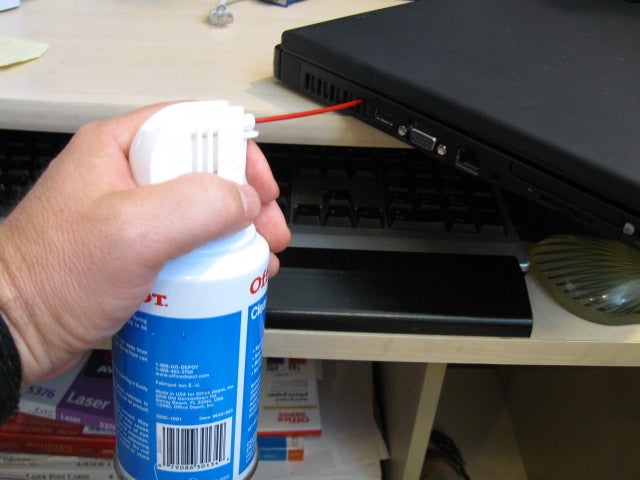
  • With the PC off, spray compressed air into the vents to remove dust. Use only a moisture-free compressed air canister.
  • If these steps don't help, take it to a professional. Unless you really know what you're doing, you don't want to mess with your laptop's innards.   
 
   Compressed air can keep your laptop cool and thus prevent undesired shutdowns.  Compressed air can keep your laptop cool and thus prevent undesired shutdowns.Could software be the culprit? Unlikely, but if your PC isn't overheating, a bad driver may be at fault. Try updating your video and sound drivers just to be safe. And it's possible that a malicious program is behind the damage. See Scan for Malware With Online Tools to see how to handle this.
Email your technology questions to me at answer@pcworld.com, or post them to a community of helpful folks on the PCW Answer Line forum.


Read more...

Watch videos and share music from within Facebook.

Saturday, September 24, 2011 Reporter: The Home Treatment 0 Responses

In addition to the introduction of Facebook's new Timeline at today's f8 Developers Conference, CEO Mark Zuckerberg showed off the social network's new integration with Spotify, Hulu and Netflix.

When you or one of your friends is listening to music through the streaming service Spotify, details are published to the newly revised timeline. From there, you can click on the update and join in to listen to the same song with your buddy, shoot a comment about how bad their taste in music is, or strike up a chat session in response.

Similarly, Netflix and Hulu are also being built into your timeline. With the update, you can watch videos directly from within Facebook and friends can see what you're watching, as well as obtain information about the video and viewing statistics, like who else spent their Sunday afternoon watching Sharktopus.

Unfortunately, Netflix services will not immediately be available in the United States due to privacy laws that are currently being reviewed by Congress.

source http://gear.ign.com/articles/119/1196021p1.html

Read more...

10 Windows 8 Facts And Rumors

Friday, September 23, 2011 Reporter: The Home Treatment 0 Responses
Windows 8 operating system is the most anticipated operating system of this year. Microsoft announced its release earlier this year and since then there is wide speculations that Windows 8 will have new, amazing and mind blowing features which will rock the market. Since Microsoft made this announcement many rumors are floating everywhere that Windows 8 will have rocking features but none of them are confirmed yet besides some leaked screenshots that indicates that Windows 8 will truly be a big technology bomb. So here I have gathered the rumors, facts and speculations that will define the face of Microsoft Windows 8. Let’s start with the top10:
 
 
1. If some of you are thinking that Windows 8 will be available this year then let me inform you that Windows 8 will not be available before 2012.

2. It will include a 128-bit architectural display which will mark the end of 32-bit operating system.

3. Facial Recognition for logging in Windows is rumored to be included in Windows 8.

4. Another very interesting fact about Windows 8 is that it will have a same system requirement as Windows 7.

5. Now Microsoft have started an integral numbering system since the launch of Windows 7 and its successor is named Windows 8 which is due to release next year. There are many speculations that the successor of Windows 8 will be known as Windows 9.

6. Microsoft generally releases its new Operating system after every three years. Like Windows Vista which was released on 2007 January, its successor Windows 7 was released almost after three years in 2009 October. So this means that Windows 8 will hit the market sometime in the fall of 2012.

7. There is a rumor that Windows 8 will feature a reset button that will remove all the viruses and other hindrances and will preserves all the apps and the settings.

8. The transparency concept that was used in the previous two versions of Windows will now be deeper and power packed in Windows 8. User will experience new and improved super bar in this version of Windows.

9. Microsoft also announced Consumer Electric Show in Las Vegas that Windows 8 will include the support for System on a Chip (SoC) and mobile ARM processors.

10. Microsoft promised that Windows 8 will have “Hybrid Boot” options that allow the system to shutdown and start faster using the “advanced hibernation functionality” and cache the system components while still being shut down and ability to create “Portable Workspace” which allows the installation of Windows 8 in USB storage devices.


Read more...

This computer (yes, computer!) costs $25

Friday, September 23, 2011 Reporter: The Home Treatment 0 Responses
Game developer David Braben has created a computer that’s about the size of a flash drive — and it’ll most likely cost less than your last date.
Braben designed the device with the goal of having an extremely affordable computer that children across the world can access. It’s a similar goal the OLPC (One Laptop Per Child) project had — create an extremely affordable computer that children in both developing countries and first-world countries can get their hands on.
The device sports a version of Linux, an open-sourced operating system that has become increasingly popular in philanthropic causes like this because it’s free to install and distribute. It will likely ship with some variation of Ubuntu, a very popular Linux distribution that has a huge development community, according to tech news site Geek.com.
“In theory, they could be given away to the child. There would be other ways of funding it,” Braben said in an interview with BBC. “They would be able to engage with a lot of things that we are all consumers of but not necessarily creators of — understanding how you put together little scripts that might run on websites and filters.”
The device has a 700-megahertz ARM processor and 128 megabytes of RAM. To put that in perspective, that’s about half as much memory as most smartphones today, which also sport processors that usually clock in at around 1 gigahertz. So it’s slightly weaker than a smartphone. There’s an SD card slot on the device that handles any storage, and it can output video and other images at 1080p resolution. It has a USB-out port that lets owners plug in a keyboard and an HDMI-out port that can connect to an HDMI-enabled television or monitor.
Braben said he hopes the device will be available to the public in around a year. Based on the components, the device will cost somewhere between £10 and £15, or around $25. It will be distributed through a charitable organization called the Raspberry Pi Foundation to promote computer science in schools.

Source 

Read more...